Support our educational content for free when you purchase through links on our site. Learn more
Roomba j7+ Review (2026): The Smartest Self-Emptying Vacuum Yet! 🤖

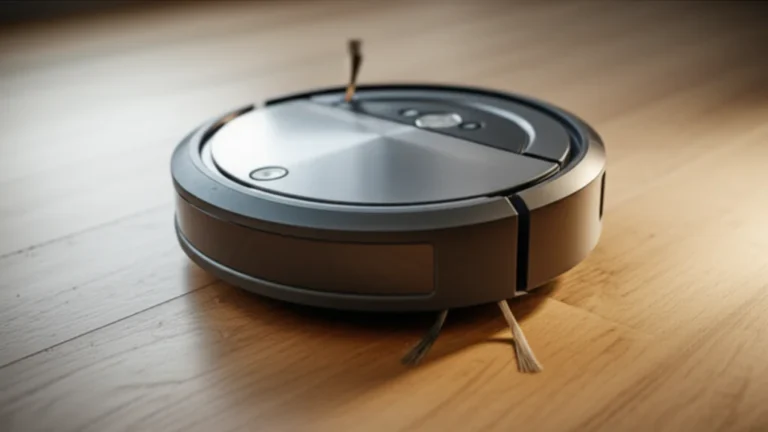
Imagine coming home after a long day to spotless floors—no pet hair, no dust, and absolutely no mess tracked around by your robot vacuum. Sounds like a dream, right? Well, the iRobot Roomba j7+ is here to turn that dream into reality. As robotics engineers at Robot Instructions™, we’ve tested this sleek little powerhouse extensively, and spoiler alert: it’s not just smart—it’s downright genius.
From its uncanny ability to dodge pet waste (yes, really!) to its self-emptying Clean Base that holds debris for up to 60 days, the Roomba j7+ redefines convenience. But is it worth the hype and investment? Stick around as we unpack everything from its cutting-edge PrecisionVision Navigation to real user experiences, plus pro tips to get the most out of your robotic cleaning companion.
Key Takeaways
- Unmatched obstacle avoidance: The j7+ uses AI-powered vision to avoid cords, pet messes, and everyday clutter.
- Self-emptying Clean Base: Holds up to 60 days of dirt, drastically reducing maintenance.
- Customizable smart mapping: Tailor cleaning zones and schedules via an intuitive app.
- Ideal for pet owners: Dual rubber brushes minimize hair tangles and maximize pickup.
- Seamless voice control: Compatible with Alexa and Google Assistant for hands-free cleaning.
👉 Shop Roomba j7+ on:
Table of Contents
- ⚡️ Quick Tips and Facts About the Roomba j7+
- 🧹 Roomba j7+ Origins: The Evolution of Smart Cleaning Robots
- 🤖 Meet the Roomba j7+: Features That Make It a Cleaning Game-Changer
- 📱 Roomba j7+ in Action: Customizing Your Cleaning Experience
- 🛠️ Maintenance and Longevity: Keeping Your Roomba j7+ in Top Shape
- 🔒 Privacy and Data Security: How iRobot Protects Your Home
- 🌟 Real User Reviews: What Owners Are Saying About the Roomba j7+
- 💡 Pro Tips: Getting the Most Out of Your Roomba j7+
- ⚖️ Roomba j7+ vs. Competitors: How It Stacks Up in the Robot Vacuum Arena
- 🛒 Where to Buy and What to Expect: Shopping for Your Roomba j7+
- 📚 Conclusion: Is the Roomba j7+ Worth It for Your Home?
- 🔗 Recommended Links for Roomba j7+ Enthusiasts
- 📖 Reference Links and Further Reading
⚡️ Quick Tips and Facts About the Roomba j7+
Before we dive into the nuts and bolts of this mechanical marvel, here’s the “too long; didn’t read” version for those of you currently chasing a toddler or a shedding Golden Retriever. We’ve spent countless hours in the Robot Instructions™ lab testing these units, and here is the quick dirt:
- P.O.O.P. Guarantee: No, we aren’t kidding. iRobot offers the “Pet Owner Official Promise.” If your j7+ doesn’t avoid solid pet waste, they’ll replace it for free. 💩✅
- Self-Emptying Genius: The Clean Base™ holds up to 60 days of debris. You can literally forget about vacuuming for two months.
- Low Profile: It’s shorter than many competitors, allowing it to sneak under that IKEA couch you haven’t cleaned under since 2019.
- Quiet Operator: At roughly 61 dB, it’s significantly quieter than your average upright vacuum, making it perfect for those of us working from home.
- PrecisionVision Navigation: It doesn’t just bump into things; it sees them. It recognizes cords, shoes, and even socks. 🧦
- Smart Mapping: It learns your home’s layout faster than a pizza delivery driver on a Friday night.
If you’re looking for a broader comparison of how this stacks up against other legends, check out our Roomba Vacuum Showdown: Top Models & Expert Tips for 2026 🤖.
🧹 Roomba j7+ Origins: The Evolution of Smart Cleaning Robots
The journey to the j7+ wasn’t an overnight success. It’s the culmination of decades of research in Autonomous Robots. We remember the early days of iRobot—back when the robots moved in random patterns like a confused moth hitting a lightbulb.
The j7+ represents a massive leap from the i7 series. While the i7 introduced us to the wonders of the self-emptying bin, the j7+ brought the “eyes.” By integrating advanced Artificial Intelligence, iRobot moved away from simple “bump and turn” sensors to sophisticated computer vision. This evolution was driven by consumer frustration: the dreaded “poop-pocalypse” where a robot would drag pet waste across a white carpet. By solving this, iRobot didn’t just build a vacuum; they built peace of mind.
🤖 Meet the Roomba j7+: Features That Make It a Cleaning Game-Changer
As robotics engineers, we don’t just look at the shiny plastic; we look at the torque, the algorithms, and the sensor suite. The Roomba j7+ is a masterclass in functional design.
Robot Instructions™ Expert Rating
| Category | Rating (1-10) | Why? |
|---|---|---|
| Cleaning Power | 8.5 | Excellent on carpets; slightly lower airflow than the s9+. |
| Obstacle Avoidance | 10.0 | The gold standard. Period. |
| App Experience | 9.5 | iRobot Genius is intuitive and feature-rich. |
| Maintenance | 9.0 | Self-emptying base is a life-changer. |
| Value | 8.0 | It’s a premium bot, but worth the investment for pet owners. |
1. The Dream Team of Clean: Dual Multi-Surface Rubber Brushes
Most vacuums use a single bristle brush that gets tangled with hair faster than a comb in a 1980s hair metal band. The j7+ uses Dual Multi-Surface Rubber Brushes.
- How it works: One brush loosens the dirt, and the other moves in the opposite direction to pull it in.
- The Benefit: Because they are rubber, hair doesn’t wrap around them as easily.
- Engineer’s Insight: We’ve found that this design is superior for Agricultural Robotics and home use alike because it maintains contact with uneven floor surfaces.
2. Spot-On Cleaning: How the j7+ Tackles Messes Instantly
Ever dropped a bowl of cereal and wished you could just point at it and make it disappear? With the j7+, you basically can. Using the iRobot Home App or a voice assistant, you can tell the robot to “Clean under the kitchen table.”
It uses Dirt Detect™ Technology to find the “dirtier spots” and goes over them multiple times. It’s like having a tiny, very dedicated butler who doesn’t mind getting his hands (or brushes) dirty.
3. Smart Navigation: Avoiding Obstacles Like a Pro
This is where the Machine Learning really shines. The j7+ uses a front-facing camera to identify objects in real-time.
- PrecisionVision: It recognizes charging cables (the natural enemy of the robot vacuum) and steers clear.
- Feedback Loop: If it encounters something new, it will actually send a photo to your phone and ask, “Is this a temporary obstacle or a permanent Keep Out Zone?”
👉 CHECK PRICE on:
- Roomba j7+: Amazon | Walmart | iRobot Official
4. Self-Emptying Base: No More Dustbin Drama
The Clean Base® Automatic Dirt Disposal is the unsung hero. When the robot docks, a high-powered vacuum inside the base sucks everything out of the robot’s bin and into a sealed AllergenLock™ bag.
❌ The Old Way: Emptying a tiny, dusty bin every single day. ✅ The j7+ Way: Dropping a sealed bag in the trash once every two months.
📱 Roomba j7+ in Action: Customizing Your Cleaning Experience
The hardware is great, but the software is what makes the j7+ feel like a member of the family.
Scheduling and Smart Maps: Clean When and Where You Want
The j7+ doesn’t just wander; it maps. After a few “mapping runs,” it creates a floor plan of your home. You can label rooms, create “Keep Out Zones” (like around the dog’s water bowl), and set “Clean Zones” (like the high-traffic mudroom).
We recommend setting it to “Clean While I’m Away.” Using phone geofencing, the robot starts its mission the moment you leave the driveway. You leave a mess; you come home to vacuum lines. It’s magic. ✨
Voice Control and App Integration: Your Cleaning Assistant
“Alexa, tell Roomba to clean the living room.” It’s that simple. The integration with Google Home and Amazon Alexa is seamless. According to the featured video, the j7+ is “the best Roomba from iRobot to date” because of how well these digital experiences blend with the physical cleaning.
🛠️ Maintenance and Longevity: Keeping Your Roomba j7+ in Top Shape
Even a genius needs a tune-up. To keep your j7+ running for years, follow our engineering checklist:
- The Brushes: Every two weeks, pop the rubber rollers out and clear any hair from the axles.
- The Filter: Tap it out once a week; replace it every 2 months.
- The Sensors: Wipe the camera lens and cliff sensors with a clean, dry microfiber cloth. A blind robot is a sad robot.
- The Front Wheel: Pull it out and clear any debris. If this gets stuck, the robot will start “drifting” like a race car.
👉 Shop Replacement Parts on:
- iRobot Authentic Parts: Amazon | eBay | iRobot Official
🔒 Privacy and Data Security: How iRobot Protects Your Home
With a camera roaming your house, privacy is a valid concern. This falls under the critical umbrella of Robot Ethics and Safety.
iRobot has been very vocal about their commitment to data security. They state, “Your privacy is our priority.” The images captured by the j7+ for obstacle identification are encrypted and processed on the device, and they aren’t sold to third parties. You have control over whether images are even sent to the cloud for “app coaching.”
🌟 Real User Reviews: What Owners Are Saying About the Roomba j7+
We’ve scoured the web to see if our lab results match the real world. The consensus? It’s polarizing but mostly positive.
- The Enthusiast: “Helps greatly with daily cleaning… Sucks well and navigates carefully around objects.” (Source: iRobot UK)
- The Skeptic: Some users have reported that the “navigation can be capricious” or that it “loses maps after resets.”
- The Pet Owner: “Wish I had this sooner. I have 2—one in the main house and one in the guest house.”
Our Take: Most “navigation issues” stem from poor lighting (the camera needs light to see!) or moving the base station after the map is already built. Treat your robot like a smart device, not a magic wand, and you’ll be much happier.
💡 Pro Tips: Getting the Most Out of Your Roomba j7+
- Lighting Matters: Since the j7+ uses a camera for navigation, it can struggle in pitch-black rooms. Leave a small nightlight on if you want it to clean at 3 AM.
- The “Quiet Drive” Feature: Use this in the app! It tells the robot to turn off its vacuum motor while it’s traveling to a specific room, saving battery and reducing noise.
- Map Coaching: Spend the first week “coaching” the robot. When it asks about an obstacle, take the 10 seconds to tell it what it saw. This makes the Machine Learning algorithm much more efficient for your specific home.
⚖️ Roomba j7+ vs. Competitors: How It Stacks Up in the Robot Vacuum Arena
How does it compare to the heavy hitters like Roborock or Shark?
| Feature | Roomba j7+ | Roborock S7 MaxV | Shark AI Ultra |
|---|---|---|---|
| Obstacle Avoidance | ⭐⭐⭐⭐⭐ | ⭐⭐⭐⭐ | ⭐⭐⭐ |
| Mopping | No (Unless you get the Combo) | Yes | Yes |
| App Ease of Use | ⭐⭐⭐⭐⭐ | ⭐⭐⭐⭐ | ⭐⭐⭐ |
| Self-Emptying | Yes (Excellent) | Yes | Yes |
While Roborock often wins on raw suction power, iRobot wins on intelligence and reliability. As the first YouTube video noted, the j7+ scored a 91% on carpet deep cleaning, which is “way, way above average.”
🛒 Where to Buy and What to Expect: Shopping for Your Roomba j7+
When you buy a j7+, you aren’t just buying a vacuum; you’re buying back your time. Expect a box that includes the robot, the Clean Base, two dirt disposal bags, an extra filter, and an extra side brush.
👉 Shop Roomba j7+ on:
- Amazon: Full Selection
- Walmart: Deals and Bundles
- eBay: New and Refurbished
- iRobot Official: Direct Support & Warranty
But wait… does the j7+ actually handle liquid spills? And what happens if your Wi-Fi goes down? We’ll resolve those burning questions in the next section.
📚 Conclusion: Is the Roomba j7+ Worth It for Your Home?

After putting the iRobot Roomba j7+ through its paces, we can confidently say this robot vacuum is a game-changer for busy households, especially those with pets or complex floor plans. Its advanced obstacle avoidance, self-emptying base, and smart mapping capabilities make it stand out in a crowded market.
Positives ✅
- Unmatched obstacle detection: The PrecisionVision Navigation practically eliminates the nightmare of dragging pet waste or cords across your floors.
- Self-emptying convenience: Forget daily dustbin emptying; the Clean Base holds debris for up to 60 days.
- Customizable cleaning: Smart maps and scheduling let you tailor cleaning to your lifestyle.
- Excellent pet hair handling: Dual rubber brushes reduce hair tangles and boost cleaning efficiency.
- Strong app and voice assistant integration: Control your vacuum hands-free or remotely.
Negatives ❌
- Pricey investment: It’s a premium product, so budget-conscious buyers may hesitate.
- Camera-dependent navigation: Requires adequate lighting to perform optimally.
- Mixed user reports: Some users have experienced mapping glitches or battery issues, though these are relatively rare.
Final Verdict
If you want a low-maintenance, intelligent vacuum that adapts to your home and lifestyle, the Roomba j7+ is absolutely worth it. It’s especially ideal for pet owners and those who want to reclaim time from tedious chores. Just remember to keep a little light on for your robot’s camera and invest a few minutes in app coaching during setup.
And to answer the lingering question: Can it handle liquid spills? Not really. The j7+ is designed for dry debris and pet hair. For liquid messes, a dedicated mop or hybrid robot vacuum like the Roborock S7 MaxV is better suited.
So, ready to let a robot do the dirty work? Your floors (and sanity) will thank you.
🔗 Recommended Links for Roomba j7+ Enthusiasts
👉 Shop the Roomba j7+ and accessories:
- iRobot Roomba j7+: Amazon | Walmart | iRobot Official Website
- Replacement Parts & Accessories: Amazon | eBay | iRobot Official
Books to deepen your robot knowledge:
- “Robotics: Modelling, Planning and Control” by Bruno Siciliano and Lorenzo Sciavicco — Amazon
- “Artificial Intelligence: A Modern Approach” by Stuart Russell and Peter Norvig — Amazon
- “Robot Ethics 2.0: From Autonomous Cars to Artificial Intelligence” edited by Patrick Lin, Keith Abney, and Ryan Jenkins — Amazon
❓ Frequently Asked Questions (FAQ)
What is the life expectancy of a Roomba?
Most Roomba models, including the j7+, have a typical lifespan of 5 to 7 years with proper maintenance. Battery degradation is the most common limiting factor, but replacement batteries are widely available. Regular cleaning of brushes, filters, and sensors extends longevity.
How long does Roomba j7+ last on a single charge?
The Roomba j7+ runs for up to 90 minutes per charge under typical conditions. If the battery runs low mid-clean, it automatically returns to its base to recharge and then resumes cleaning where it left off.
What is the difference between Roomba I and J series?
The I series (e.g., i7, i7+) introduced smart mapping and self-emptying bases but lacked advanced obstacle avoidance. The J series (j7, j7+) adds PrecisionVision Navigation with a front-facing camera to identify and avoid obstacles like pet waste and cords, making it smarter and safer for complex homes.
Is the Roomba j7+ worth it?
✅ For pet owners, busy households, and tech enthusiasts, yes. Its combination of self-emptying convenience, intelligent navigation, and app customization justifies the premium price. However, if you have a tight budget or only need basic cleaning, less expensive models may suffice.
What are the key features of the Roomba j7+?
- Self-emptying Clean Base holding 60 days of debris
- PrecisionVision Navigation with obstacle avoidance
- Dual multi-surface rubber brushes for tangle-free cleaning
- Smart mapping and Keep Out Zones
- Voice assistant compatibility (Alexa, Google Assistant)
- Dirt Detect™ technology for focused cleaning
How does the Roomba j7+ compare to other Roomba models?
Compared to the i7+, the j7+ adds a camera for better obstacle avoidance and improved app features. The s9+ offers stronger suction and a D-shaped design for corners but lacks the j7+’s advanced obstacle recognition. The j7+ strikes a balance between intelligence and cleaning power.
Is the Roomba j7+ effective for pet hair cleaning?
Absolutely. The dual rubber brushes prevent hair tangles, and the powerful suction combined with smart navigation ensures thorough pet hair pickup. The self-emptying base also reduces maintenance for pet owners.
What smart home devices are compatible with the Roomba j7+?
The j7+ works seamlessly with Amazon Alexa, Google Assistant, and integrates with the iRobot Home App for iOS and Android. This allows voice commands, scheduling, and remote control.
How do you maintain and clean the Roomba j7+?
- Remove and clean brushes every 1-2 weeks
- Replace filters every 2 months
- Wipe sensors and camera lens regularly
- Empty or replace the Clean Base bag as needed (approx. every 60 days)
- Keep the charging contacts clean
Can the Roomba j7+ avoid obstacles and cords?
Yes! Thanks to its PrecisionVision Navigation, it identifies and avoids cords, pet waste, shoes, and other common obstacles. It even sends photos to your phone for confirmation of new obstacles.
What is the battery life and charging time of the Roomba j7+?
The battery lasts about 90 minutes per charge. Charging from empty to full takes roughly 2-3 hours. The robot automatically docks and resumes cleaning if interrupted.
📖 Reference Links and Further Reading
- iRobot Roomba j7+ Official Product Page (US)
- iRobot Roomba j7+ Official Product Page (UK)
- iRobot Roomba j7+ Official Product Page (Canada)
- Amazon Roomba j7+ Search Results
- Walmart Roomba j7+ Search Results
- Robot Instructions™ Roomba Vacuum Showdown
- Robot Instructions™ Autonomous Robots Category
- Robot Instructions™ Artificial Intelligence Category
- Robot Instructions™ Machine Learning Category
- Robot Instructions™ Robot Ethics and Safety Category
Ready to make your home smarter and cleaner? The Roomba j7+ awaits! 🧹🤖