Support our educational content for free when you purchase through links on our site. Learn more
Robot Assistant Guide: What Can One Really Do? 🤖

A robot assistant is worth considering when it can reliably handle a specific task you actually need—but don’t assume a friendly voice or humanoid shape means it can manage your whole home. Robot vacums and telepresence devices already serve practical roles; general-purpose humanoids such as 1X NEO are more ambitious, and their capabilities, availability, and limits deserve careful checking.
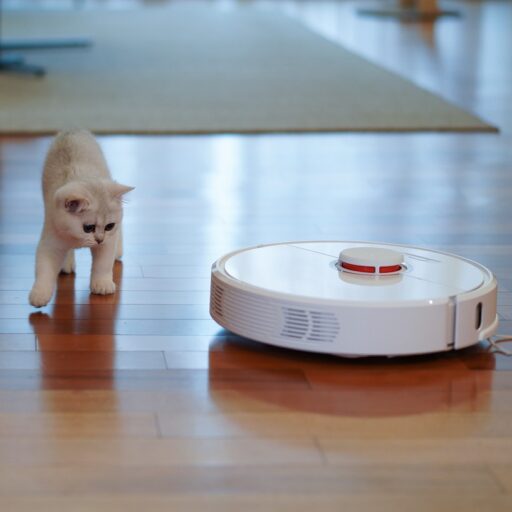
We’ve seen how quickly a polished robot demo can win over a room. Then comes the everyday test: a cable across the floor, a pet in the way, or a Wi-Fi dead zone—and suddenly the most useful feature is a clear, safe way to ask for help.
This guide explains what robot assistants can do, how they work, and what to consider before choosing one. We also examine privacy, safety, running costs, accessibility, and emerging home robots, separating demonstrated capabilities from promises.
Key Takeaways
- Choose a robot for a task it can perform reliably today, not a broad promise of future automation.
- Robot assistants range from specialized cleaners to mobile telepresence devices and emerging humanoids. Their capabilities are not interchangeable.
- Autonomy is task-specific: a robot may navigate on its own but still need human guidance for unfamiliar situations.
- Check privacy, safety, compatibility, support, and ongoing costs before buying or placing an order.
- Treat emerging products such as 1X NEO as evolving technology. Verify current features, availability, and terms directly with the manufacturer.
- Use robots as support tools, not replacements for caregivers or safety-critical human help.
Table of Contents
- ⚡ Quick Tips and Facts About Robot Assistants
- 🤖 What Is a Robot Assistant?
- Robot assistant vs. virtual assistant
- How AI, sensors, and robotics work together
- 🕰️ A Brief History of Personal and Home Robots
- 🧭 Types of Robot Assistants: From Home Helpers to Workplace Robots
- Home and domestic robot assistants
- Healthcare, eldercare, and accessibility robots
- Education, hospitality, and workplace robots
- Social, companion, and telepresence robots
- 🏠 What Can a Robot Assistant Do?
- Household chores and home automation
- Communication, reminders, and companionship
- Tasks today vs. promises for tomorrow
- 🧠 How Robot Assistants Work
- AI, machine learning, and voice control
- Computer vision, navigation, and obstacle avoidance
- Robotic hands, mobility, and task learning
- Cloud computing, Wi-Fi, and smart-home integration
- 🛒 How to Choose the Best Robot Assistant
- Match the robot to your needs and living space
- Autonomy, reliability, and ease of use
- Compatibility, accessibility, and support
- Questions to ask before you buy
- 🏆 Robot Assistant Brands and Models to Know
- Home robots from Amazon, Samsung, and LG
- Humanoid and general-purpose robots from 1X, Figure, and Tesla
- Service and companion robots from Temi, Miko, and others
- 🌟 NEO and the New Generation of Home Robot Assistants
- What is 1X NEO designed to do?
- Home tasks, learning, and human interaction
- Autonomy, remote assistance, and 1X Experts
- Internet connection, charging, and home setup
- Subscriptions, purchase terms, and refunds
- Privacy, data use, and remote access
- Safety, maintenance, and operating limits
- Availability, delivery, and manufacturing
- 🔐 Privacy, Security, and Data Protection
- Cameras, microphones, and personal information
- Remote operation and access controls
- Practical steps to protect your privacy
- 🛡️ Robot Assistant Safety at Home and Work
- Children, pets, stairs, and fragile objects
- Physical safety, emergency stops, and supervision
- Water, weather, and indoor-versus-outdoor use
- 💵 Ownership Costs, Subscriptions, and Running Expenses
- Purchase, rental, and subscription models
- Electricity, repairs, accessories, and insurance
- How to assess long-term value
- 🔧 Setup, Maintenance, and Troubleshooting
- Preparing your home and connecting to Wi-Fi
- Routine cleaning, software updates, and repairs
- Common robot assistant problems and fixes
- ♿ Robot Assistants for Accessibility and Independent Living
- 📈 The Future of Robot Assistants
- Humanoid robots and general-purpose home help
- Ethical, social, and workforce questions
- What to expect from the next generation
- ❓ Frequently Asked Questions About Robot Assistants
- Can a robot assistant work without internet?
- Can robot assistants cook, clean, or do laundry?
- Are robot assistants safe around children and pets?
- Do robot assistants need a subscription?
- Can a robot assistant replace a caregiver or household worker?
- ✅ Quick Tips for Getting the Most from a Robot Assistant
- Conclusion
- Recommended Links
- Reference Links
Table of Contents
- ⚡ Quick Tips and Facts About Robot Assistants
- 🤖 What Is a Robot Assistant?
- Robot assistant vs. virtual assistant
- How AI, sensors, and robotics work together
- 🕰️ A Brief History of Personal and Home Robots
- 🧭 Types of Robot Assistants: From Home Helpers to Workplace Robots
- Home and domestic robot assistants
- Healthcare, eldercare, and accessibility robots
- Education, hospitality, and workplace robots
- Social, companion, and telepresence robots
- 🏠 What Can a Robot Assistant Do?
- Household chores and home automation
- Communication, reminders, and companionship
- Tasks today vs. promises for tomorrow
- 🧠 How Robot Assistants Work
- AI, machine learning, and voice control
- Computer vision, navigation, and obstacle avoidance
- Robotic hands, mobility, and task learning
- Cloud computing, Wi-Fi, and smart-home integration
- 🛒 How to Choose the Best Robot Assistant
- Match the robot to your needs and living space
- Autonomy, reliability, and ease of use
- Compatibility, accessibility, and support
- Questions to ask before you buy
- 🏆 Robot Assistant Brands and Models to Know
- Home robots from Amazon, Samsung, and LG
- Humanoid and general-purpose robots from 1X, Figure, and Tesla
- Service and companion robots from Temi, Miko, and others
- 🌟 NEO and the New Generation of Home Robot Assistants
- What is 1X NEO designed to do?
- Home tasks, learning, and human interaction
- Autonomy, remote assistance, and 1X Experts
- Internet connection, charging, and home setup
- Subscriptions, purchase terms, and refunds
- Privacy, data use, and remote access
- Safety, maintenance, and operating limits
- Availability, delivery, and manufacturing
- 🔐 Privacy, Security, and Data Protection
- Cameras, microphones, and personal information
- Remote operation and access controls
- Practical steps to protect your privacy
- 🛡️ Robot Assistant Safety at Home and Work
- Children, pets, stairs, and fragile objects
- Physical safety, emergency stops, and supervision
- Water, weather, and indoor-versus-outdoor use
- 💵 Ownership Costs, Subscriptions, and Running Expenses
- Purchase, rental, and subscription models
- Electricity, repairs, accessories, and insurance
- How to assess long-term value
- 🔧 Setup, Maintenance, and Troubleshooting
- Preparing your home and connecting to Wi-Fi
- Routine cleaning, software updates, and repairs
- Common robot assistant problems and fixes
- ♿ Robot Assistants for Accessibility and Independent Living
- 📈 The Future of Robot Assistants
- Humanoid robots and general-purpose home help
- Ethical, social, and workforce questions
- What to expect from the next generation
- ❓ Frequently Asked Questions About Robot Assistants
- Can a robot assistant work without internet?
- Can robot assistants cook, clean, or do laundry?
- Are robot assistants safe around children and pets?
- Do robot assistants need a subscription?
- Can a robot assistant replace a caregiver or household worker?
- ✅ Quick Tips for Getting the Most from a Robot Assistant
- Conclusion
- Recommended Links
- Reference Links
⚡ Quick Tips and Facts About Robot Assistants
A robot assistant is a machine designed to help with physical or information-based tasks. That can mean a robot vacuum mapping your living room, a mobile robot carrying a video call around a care facility, or a humanoid robot attempting household chores. The phrase is broad, so first ask: does the robot actually move and manipulate the world, or does it mainly answer questions on a screen?
At Robot Instructions™, our robotics guide starts with a practical distinction: “robot assistant” is a category, not a single product type. Capabilities, safety, privacy, and reliability vary enormously.
| Quick fact | What it means for you |
|---|---|
| Robot assistants range from single-task machines to humanoids | A robot vacuum is generally more dependable at vacuuming than a general-purpose robot is at many chores. |
| “AI-powered” doesn’t mean fully autonomous | A robot may rely on a person, remote operator, cloud service, or carefully prepared environment. |
| Demonstrations are not the same as verified everyday performance | Look for independent testing and clear limits, not just a polished product video. |
| Homes are difficult robot environments | Rugs, stairs, pets, clutter, reflective surfaces, and changing light can all complicate sensing and movement. |
| Privacy deserves equal attention to features | Cameras, microphones, home maps, and cloud-connected accounts can collect sensitive data. |
| Start with a specific need | Decide whether you need cleaning, reminders, telepresence, accessibility support, or experimental all-purpose help. |
✅ Best practical advice: Buy or adopt a robot for a job it can reliably do now, not for a chore it may learn to do later.
❌ Common mistake: Treating a humanoid shape or conversational voice as proof that a robot can safely handle unsupervised household work.
For real-world context, our guide to autonomous robots explains why autonomy is not a simple on/off switch. It’s a spectrum: a machine can navigate independently but still need human help to recognize a new object or recover from an awkward situation.
🤖 What Is a Robot Assistant?
A robot assistant is a physical system that senses its surroundings and performs actions to assist people. It may move, speak, pick up objects, deliver items, clean floors, or help someone communicate with a remote person.
The International Organization for Standardization’s robotics vocabulary distinguishes robots by their autonomy and application. In everyday language, though, “assistant” can cover everything from a simple automatic vacuum to a complex humanoid.
Robot assistant vs. virtual assistant
A virtual assistant such as Amazon Alexa, Apple Siri, or Google Assistant mainly processes requests and controls software or connected devices. A robot assistant adds a physical body: wheels, arms, sensors, grippers, or another mechanism that lets it act in the real world.
| Capability | Virtual assistant | Robot assistant |
|---|---|---|
| Answer questions | Usually | Often, if speech and software features are included |
| Set reminders | Yes | Sometimes |
| Move through a room | No, not by itself | Yes, if designed for mobility |
| Handle physical objects | No | Only if equipped and trained for manipulation |
| Clean a floor | No | A robot vacuum or mop can |
| Main challenges | Speech recognition, context, internet access | All of those, plus navigation, balance, manipulation, and physical safety |
A robot may use Alexa or another voice assistant without being a general-purpose helper. Voice control is an interface, not a guarantee of robotic capability.
How AI, sensors, and robotics work together
A robot assistant generally combines three jobs:
- Perception: Cameras, lidar, depth sensors, microphones, touch sensors, or bump sensors gather information.
- Decision-making: Software interprets the data and chooses what to do.
- Action: Motors, wheels, joints, grippers, or speakers carry out the decision.
The loop sounds tidy on paper. In a real home, the robot might see a dark sock on a patterned rug and have to decide whether it is a sock, a shadow, or a tiny portal to robot confusion. Our robot design and machine learning coverage explores the engineering behind these trade-offs.
🕰️ A Brief History of Personal and Home Robots

The idea of a mechanical helper is older than today’s AI boom. Industrial robots became common in factories during the twentieth century, where tasks could be controlled in structured spaces. Household robots arrived later, starting with machines built for narrow, repeatable jobs.
The International Federation of Robotics tracks industrial and service robotics as distinct fields. That distinction still matters: a factory robot works in a designed environment; a home robot has to cope with the environment you actually have.
| Era | Milestone | Why it matters |
|---|---|---|
| Early automation | Mechanical devices and automated machinery | Established the idea of machines carrying out repetitive work |
| Industrial robotics | Programmable arms in manufacturing | Made precise, structured automation commercially useful |
| Domestic robotics | Robotic floor cleaners and lawn mowers | Brought narrow-purpose robots into everyday settings |
| Social and service robots | Telepresence, reception, and companion devices | Added interaction and mobility beyond industrial tasks |
| Current generation | AI-enabled mobile and humanoid systems | Aims to combine perception, conversation, and physical assistance |
The story is now moving from “one robot, one chore” toward flexible machines that could handle multiple tasks. The tricky question—and the one that separates real utility from a dazzling demo—is whether a robot can do those jobs reliably, safely, and without constant supervision.
🧭 Types of Robot Assistants: From Home Helpers to Workplace Robots
“Robot assistant” can mean very different things depending on where the robot works and what it is built to do.
Home and domestic robot assistants
Domestic robots are generally designed for a limited set of household tasks:
- Robot vacums and mops: iRobot Romba, Roborock, and Eufy models clean floors with varying mapping and obstacle-avoidance features.
- Lawn-mowing robots: Husqvarna Automower and other robotic mowers maintain lawns within configured boundaries.
- Companion and mobile robots: Devices such as Temi can move through indoor spaces and support video calling or communication.
- Humanoid home robots: Companies including 1X are developing robots intended to handle a broader range of domestic tasks.
The benefit of a specialized robot is focus. A robot vacuum doesn’t need to learn how to fold socks; it needs to vacuum. That narrower mission usually makes performance easier to evaluate.
Healthcare, eldercare, and accessibility robots
Assistive technology can support communication, social connection, reminders, and independent living. Examples include telepresence devices and medication-reminder systems, but a general-purpose robot should not be confused with a licensed caregiver or emergency-response service.
The National Institute on Aging discusses supports that can help people age at home. A robot may complement a care plan, but decisions should include the user, caregivers, clinicians, and relevant accessibility specialists.
Education, hospitality, and workplace robots
Service robots can guide visitors, carry supplies, deliver items, or assist with structured education activities. In workplaces, the environment is often planned around the robot’s route and task, which can make deployment more predictable than in a busy home.
For agricultural applications, including autonomous field equipment, see our Agricultural Robotics coverage.
Social, companion, and telepresence robots
A social robot may communicate through speech, facial expressions, a display, or movement. Telepresence robots let a remote person drive or connect through a mobile screen. These systems can support connection, but they are not automatically a substitute for human company.
Good fit: someone needs an easier way to join a remote conversation.
Poor fit: someone expects a robot to provide emotional care, clinical judgment, or guaranteed monitoring without human involvement.
🏠 What Can a Robot Assistant Do?
The answer depends on the machine. Some robots are excellent at one repetitive job; emerging general-purpose systems may attempt more, but their real-world abilities should be checked task by task.
Household chores and home automation
A robot assistant might:
- Vacuum or mop a mapped floor.
- Patrol a room or provide a mobile video-call screen.
- Carry objects, if it has suitable manipulation hardware and software.
- Remind you about routines or control connected devices.
- Water plants or perform a chore when the task and environment are supported.
For smart-home control, device compatibility matters. A robot might understand “turn off the lights” but still need compatible lighting, network access, and a working integration.
Communication, reminders, and companionship
Some devices can support video calling, voice interaction, reminders, games, or educational activities. These features can be useful, particularly when movement or access to a phone is difficult. But conversational fluency can create a misleading impression of understanding: a robot may sound confident while misunderstanding the situation.
We recommend testing the exact interaction you need. Ask it to set a reminder, call a family member, navigate a specific room, or respond to an accessibility need before relying on it.
Tasks today vs. promises for tomorrow
| Task | Established capability in some products | What to verify |
|---|---|---|
| Vacuuming | Widely available in robot vacums | Hair handling, obstacle detection, mapping, and room transitions |
| Mopping | Available in dedicated floor-cleaning robots | Water management, floor compatibility, and cleaning-pad maintenance |
| Telepresence | Available in mobile video-call robots | App support, connectivity, camera controls, and accessibility |
| Picking up objects | Emerging in some general-purpose robots | Object types, weight limits, grasp reliability, and supervision needs |
| Cooking or handling hot items | Not a routine capability for consumer home robots | Safety certification, demonstrated task range, and manufacturer limits |
| Laundry folding | Experimental or limited | Performance across fabrics, garments, and real laundry piles |
That gap between “can do in a demo” and “can do every Tuesday” is where careful buyers earn their keep.
🧠 How Robot Assistants Work
AI, machine learning, and voice control
Speech recognition turns spoken words into a software command. Natural-language systems may interpret intent, while machine-learning models help classify images, predict movement, or improve task performance.
The NIST overview of AI is a useful starting point for understanding AI as a collection of methods rather than a magical single feature. In robotics, the model still needs sensors, hardware, safe motion planning, and a way to handle uncertainty.
Computer vision, navigation, and obstacle avoidance
Robots may use cameras, lidar, infrared sensors, depth cameras, or combinations of these to map and navigate. Each sensor has limitations:
- Cameras can be affected by lighting, glare, and oclusion.
- Lidar measures distance but may not identify what an object is.
- Bump sensors detect contact after it happens.
- Depth sensors can help estimate the shape and distance of nearby objects.
A floor map is not necessarily a complete understanding of your home. A robot may know where the sofa is while failing to recognize that the charging cable beside it is a trip hazard.
Robotic hands, mobility, and task learning
Manipulation is harder than navigation. A robot must identify an object, reach it, grasp it with suitable force, and move it without dropping or damaging it. Flexible objects such as clothes, thin items, and crumpled packaging are particularly challenging.
For a deeper look at levels of independent operation, see our Autonomous Robots category. Autonomy is task-specific: a robot may autonomously travel between rooms but require help to load a dishwasher.
Cloud computing, Wi-Fi, and smart-home integration
Some robots process data locally; others rely on cloud services for voice functions, maps, updates, or advanced AI. If the internet drops, basic movement may continue while cloud-dependent features stop working.
Before buying, check:
- Whether core tasks work offline.
- Whether the robot requires a specific app or account.
- Which smart-home ecosystems it supports.
- How software updates and security fixes are delivered.
- What happens if the company changes or ends a service.
🛒 How to Choose the Best Robot Assistant
Match the robot to your needs and living space
Start with a written task list. Pick the one recurring problem that matters most.
- Name the task: cleaning, reminders, communication, carrying, or accessibility support.
- Describe the environment: stairs, rugs, narrow doors, pets, clutter, floor types, and network coverage.
- Define success: for example, “cleans the kitchen without daily rescue,” not “uses advanced AI.”
- Set a supervision limit: decide how often you are willing to intervene.
- Check the return and support policy: a robot that doesn’t suit your space should not become an expensive floor ornament.
Autonomy, reliability, and ease of use
Ask whether the robot can complete the whole task, not just start it. Look for independent reviews that explain testing conditions and note failures. A useful review shows the robot handling routine obstacles—not only a carefully staged demonstration.
| Factor | Strong sign | Caution sign |
|---|---|---|
| Autonomy | Clear description of tasks completed without human help | “Fully autonomous” with no task-level examples |
| Reliability | Repeatable results and documented limits | Only promotional videos or scripted demos |
| Recovery | Safe stop, clear alerts, and simple restart | Requires frequent manual resets |
| Ease of use | Straightforward setup and accessible controls | Multiple accounts, apps, and paid services for core tasks |
| Support | Published manuals, warranty terms, and service path | Unclear support arrangements or no repair information |
Compatibility, accessibility, and support
Check the robot’s physical dimensions, turning space, threshold limits, charging location, app accessibility, voice options, and service availability. If you are buying for an older adult or a disabled person, include the intended user in setup and testing. A robot that is easy for an engineer to operate may still be frustrating for the person it is meant to help.
Questions to ask before you buy
- What exact tasks are supported today?
- Which tasks require teleoperation or human help?
- Does the robot record video, audio, or room maps?
- Can you disable sensors or delete stored data?
- Does it work during an internet outage?
- What repairs, consumables, and updates are required?
- Is the product available for delivery in your location?
- Can you return it if it cannot handle your home?
🏆 Robot Assistant Brands and Models to Know
Home robots from Amazon, Samsung, and LG
- Amazon Astro is a mobile home robot with Alexa features and camera-based home monitoring. Check Amazon’s official Astro information for current availability and capabilities.
- Samsung Ballie has been presented as a mobile home companion and smart-home controller. Product availability and final features can change; consult Samsung Newsroom for official updates.
- LG CLOi is a family of service-robot concepts and products for settings such as hospitality and business. See LG Business Solutions for relevant information.
These products are not interchangeable. Some focus on monitoring or interaction, while others are designed for commercial delivery and service.
Humanoid and general-purpose robots from 1X, Figure, and Tesla
- 1X NEO is positioned as a home robot intended to assist with household tasks and interaction.
- Figure develops humanoid robots for general-purpose work; see Figure’s official site.
- Tesla Optimus is a humanoid-robot program described by Tesla.
These companies are pursuing ambitious capabilities, but announcements and demonstrations should not be treated as independent proof of routine consumer availability. Compare task evidence, safety provisions, support, and purchase terms—not just the robot’s shape.
Service and companion robots from Temi, Miko, and others
- Temi offers a mobile personal robot focused on telepresence and interaction; see Temi’s official site.
- Miko makes interactive educational and companion robots for children; see Miko’s official site.
- NEURA Robotics MIRA is described by its manufacturer as a cognitive service robot; see NEURA Robotics.
Each brand targets a different user and environment. For any product, confirm that the model is currently available and that the features you care about are included in the specific version sold in your region.
🌟 NEO and the New Generation of Home Robot Assistants
What is 1X NEO designed to do?
1X NEO is presented as a humanoid home robot designed to assist with household tasks and provide conversational interaction. 1X describes its goal as taking on “the boring and mundane tasks around the house so you can focus on what matters to you.”
That is the ambition. The practical question is how much of the chore list NEO can perform independently, consistently, and safely in an ordinary home.
The company’s product page describes NEO as autonomous by default, while noting that Early Access provides foundational autonomy and that human assistance may help the robot learn unfamiliar tasks. Those statements can coexist: a product may be autonomous for supported tasks while still needing human guidance for new or difficult ones.
Home tasks, learning, and human interaction
1X describes task scheduling and a chore-list approach, alongside conversation, questions, stories, and games. It also describes NEO as using visual and spatial awareness and memory to personalize interactions.
We’d evaluate those features separately:
| Feature area | What the manufacturer describes | What to verify before relying on it |
|---|---|---|
| Household help | Scheduled tasks and assistance with chores | Which tasks are currently supported and how often human help is needed |
| Conversation | Questions, advice, jokes, stories, and games | Whether it works offline, how it handles errors, and what data it retains |
| Learning | Continued use can support new capabilities | Whether learning happens locally, through cloud processing, or human guidance |
| Safety and physical design | Soft, lightweight, quiet, and gentle design claims | Independent test results, operating limits, and safety documentation |
For the “smart brain, safe body” perspective, the supplied first video about NEO argues that teleoperation can help train and improve robot behavior. Its narrator says “the dream finally feels within reach,” while also acknowledging the robot is “not perfect.” Watch the featured video as an example of that optimistic view, but treat a demonstration as a snapshot—not a guarantee of unsupervised performance.
Autonomy, remote assistance, and 1X Experts
1X describes 1X Experts as people who may guide NEO through unfamiliar tasks. This is an important distinction for buyers: a robot can act autonomously much of the time while still depending on remote assistance in edge cases or when learning.
Ask the provider:
- Can a human operator see through the robot’s cameras?
- When can remote assistance start?
- Does the user approve each session?
- Are sessions recorded, and how long are recordings kept?
- Can the robot continue safely if assistance is unavailable?
A competing video summary describes teleoperation as a way to guide a robot and improve its AI system. That framing may be useful for understanding how robot-learning data is collected; it does not establish how often NEO will need teleoperation or what privacy controls apply. The manufacturer’s current written terms should take precedence over assumptions based on a video.
Internet connection, charging, and home setup
For any mobile home robot, check the official setup requirements before rearranging your living room. Confirm:
- Wi-Fi band and signal requirements.
- Whether core functions require cloud access.
- Charging method and dock location.
- Minimum clearance around the charging area.
- Supported floor types, thresholds, and stairs.
- Whether the robot can safely stop or call for help if it gets stuck.
We won’t invent NEO specifications that aren’t published. If a manufacturer has not provided a clear battery runtime, charging time, network requirement, or environmental limit, treat that detail as unconfirmed and ask before committing.
Subscriptions, purchase terms, and refunds
1X’s product information has described an order deposit, but a deposit is not the same thing as a confirmed full purchase price or a complete cost of ownership. Because terms can change, check the latest 1X NEO product page and the linked purchase agreement.
Before placing an order, read the exact terms for:
- Deposit amount and refund eligibility.
- Delivery estimates and what can delay delivery.
- Whether a subscription is required for core features.
- What happens if the product is unavailable in your region.
- Cancellation rights, warranty coverage, and service arrangements.
The supplied competitor summary says the company lists a $200 deposit, but does not give a full purchase price. We therefore avoid presenting that figure as a current offer; verify the live terms directly.
Privacy, data use, and remote access
A home robot may use cameras, microphones, movement data, room maps, and cloud services. If a remote expert can help operate it, that raises additional questions about who can access live or recorded sensor data.
Before purchase, find the product’s privacy notice and ask whether you can:
- Turn off camera or microphone access.
- Restrict remote assistance.
- View and delete collected data.
- Keep processing local for particular features.
- Set access controls for household members and guests.
Safety, maintenance, and operating limits
1X describes NEO’s design as soft, lightweight, quiet, and intended for gentle interaction. These are meaningful design goals, but they are not substitutes for published safety testing and clear instructions.
Confirm the manufacturer’s guidance on children, pets, stairs, wet areas, delicate objects, and supervision. Don’t assume the robot is waterproof, safe outdoors, or capable of handling hot, sharp, or heavy objects unless its documentation explicitly says so.
Availability, delivery, and manufacturing
Delivery windows, product configuration, manufacturing location, and supported countries can change as a product moves from announcement to commercial release. Check 1X’s official information for the latest details and get commitments in writing. A release announcement is not the same as a confirmed delivery slot.
🔐 Privacy, Security, and Data Protection
Cameras, microphones, and personal information
A mobile robot can collect more than a traditional smart speaker because it may move through the home while recording environmental information. The Federal Trade Commission’s consumer privacy guidance recommends understanding what information services collect and how it is used.
Review whether the robot stores:
- Audio recordings or transcripts.
- Video or still images.
- Room maps and object locations.
- User profiles, routines, or voice data.
- Diagnostic logs and remote-support sessions.
Remote operation and access controls
A remote operator may be useful when a robot cannot complete a task, but access needs clear boundaries. Confirm whether remote sessions require consent, whether a visible indicator signals access, and whether you can disable the function.
Use a unique password, enable multifactor authentication where available, and keep the robot’s app and firmware updated. For broader issues involving responsible design and oversight, see our Robot Ethics and Safety category.
Practical steps to protect your privacy
- Read the privacy policy before setup, not after the robot has mapped the house.
- Use the minimum permissions needed for your intended features.
- Set separate household accounts where supported.
- Disable recording or remote access when you don’t need it.
- Delete old maps and recordings using the manufacturer’s controls.
- Keep guests informed if cameras or microphones may be active.
- Check update and support policies so known security issues can be addressed.
🛡️ Robot Assistant Safety at Home and Work
Children, pets, stairs, and fragile objects
A robot’s sensors may miss small toys, pet accidents, charging cables, or objects that blend into a floor. Before running it unattended:
- Clear small items from its route.
- Secure cables and loose rugs.
- Use stair boundaries or physical barriers if required.
- Keep pets away during initial testing.
- Store medication, cleaning chemicals, and sharp objects securely.
Do not assume a robot can distinguish a sleeping pet from a blanket or a child’s toy from household clutter.
Physical safety, emergency stops, and supervision
Check the manual for emergency-stop controls, safe operating zones, and recovery instructions. For humanoid or mobile robots, ask how the system handles falls, collisions, trapped limbs, and power loss.
The U.S. Consumer Product Safety Commission provides consumer safety information and recall notices. A product’s marketing language is not a substitute for safety instructions or a clear process for reporting defects.
Water, weather, and indoor-versus-outdoor use
Indoor household robots are not automatically suitable for outdoor use, and “water-resistant” does not mean safe to operate in rain or near standing water. Check the product’s environmental ratings and manufacturer guidance. Keep charging equipment away from wet areas, and never test a robot’s water tolerance by improvising a splash test.
💵 Ownership Costs, Subscriptions, and Running Expenses
Purchase, rental, and subscription models
Robots may be sold outright, offered through a subscription, rented, or supplied as part of a service. Read what each model includes and whether the robot remains useful if a subscription ends.
For emerging products such as NEO, separate the deposit, full purchase terms, subscription, and service fees. These are different obligations, and a deposit alone does not tell you the total ownership cost.
Electricity, repairs, accessories, and insurance
Potential ongoing costs include:
- Electricity and charging equipment.
- Filters, brushes, pads, and other consumables.
- Replacement batteries or components.
- Repairs and shipping.
- App or cloud subscriptions.
- Damage coverage or insurance, if available.
Do not compare a robot’s purchase cost with a human service as if the robot needs no maintenance or supervision. Count the time you’ll spend clearing paths, troubleshooting, cleaning parts, and checking results.
How to assess long-term value
Use this simple scorecard:
| Question | Why it matters |
|---|---|
| Does it solve a frequent problem? | A useful daily task matters more than a rarely used novelty feature. |
| Can it complete the task without frequent rescue? | Intervention time can erase convenience. |
| Are consumables and repairs accessible? | A robot is less useful if routine parts are hard to obtain. |
| Does it require a subscription? | Ongoing service terms affect long-term use. |
| Is your data handled acceptably? | Convenience should not require privacy compromises you dislike. |
🔧 Setup, Maintenance, and Troubleshooting
Preparing your home and connecting to Wi-Fi
- Choose a stable charging location with the clearance specified by the manufacturer.
- Remove loose cables, toys, and unstable objects from the robot’s route.
- Check Wi-Fi coverage where the robot will operate.
- Install the official app from the manufacturer’s listed source.
- Create a strong, unique account password.
- Update the robot’s firmware before regular use.
- Run a supervised test and inspect the map or route for errors.
Routine cleaning, software updates, and repairs
Follow the model’s manual for cleaning sensors, wheels, brushes, grippers, and charging contacts. Avoid solvents or water on components unless the manufacturer explicitly permits them.
Keep a simple maintenance log. If a robot’s performance suddenly changes, check for blocked sensors, worn consumables, changed furniture, or a software update before assuming the hardware has failed.
Common robot assistant problems and fixes
| Problem | First checks |
|---|---|
| Robot loses its route | Clean sensors, check lighting, inspect the map, and remove new obstacles |
| Robot won’t connect | Confirm Wi-Fi band, signal strength, app permissions, and account status |
| Battery drains quickly | Review workload, battery age, charging contact cleanliness, and update notes |
| Robot repeatedly gets stuck | Identify the specific threshold, rug, cable, or tight turn and adjust the environment |
| Voice commands fail | Check microphone permissions, language settings, internet access, and supported commands |
| Remote features stop working | Review service status, account permissions, and privacy controls |
If the fix involves opening a sealed battery pack or bypassing a safety feature, stop and contact the manufacturer. A curious screwdriver is not a repair strategy.
♿ Robot Assistants for Accessibility and Independent Living
A robot may support independence by carrying a video call, providing reminders, enabling voice access, or performing a specific routine task. The best option depends on the person’s goals, dexterity, hearing, vision, mobility, internet access, and comfort with technology.
Involve the intended user in selection and setup. Test the robot in the actual home, with the actual routes and routines. If the goal is safety monitoring or medical support, confirm whether the device is designed and approved for that use; a consumer robot should not be assumed to provide emergency response.
📈 The Future of Robot Assistants
Humanoid robots and general-purpose home help
Humanoids are designed to use spaces and tools built for people. That could make them more flexible than machines limited to one task, but human-shaped hardware alone does not solve perception, dexterity, reliability, or safety.
Companies such as 1X, Figure, and Tesla are pursuing humanoid robotics. Their progress is worth watching, while keeping a clear boundary between prototypes, demonstrations, pilots, and widely supported consumer products.
Ethical, social, and workforce questions
Robots raise questions about worker displacement, data collection, consent, responsibility, and the design of systems used around vulnerable people. Teleoperation may make a robot more useful, but it also means a human could receive access to sensor data or influence physical actions in a home.
Our Robot Ethics and Safety resources examine these concerns. Buyers should ask who is accountable when a robot makes a mistake and what support is available after deployment.
What to expect from the next generation
Likely areas of development include better grasping, more reliable navigation, clearer human-robot communication, and stronger safety systems. The most meaningful progress will not be a robot that performs a dramatic trick once. It will be a robot that finishes an ordinary task repeatedly, explains what it cannot do, and fails safely when something goes wrong.
❓ Frequently Asked Questions About Robot Assistants
Can a robot assistant work without internet?
Some robots can perform basic movement or cleaning offline, while voice assistants, cloud AI, remote support, updates, or smart-home integrations may require internet access. Check the manufacturer’s documentation for each function. “Works offline” should mean the specific task you need still works—not merely that the robot can turn on.
Can robot assistants cook, clean, or do laundry?
Dedicated robot vacums and mops can clean floors within their design limits. Cooking and laundry involve variable objects, heat, liquids, fabric, and safety risks, so they are much harder. Treat claims about these tasks as product-specific and ask for evidence of repeated performance in ordinary homes.
Are robot assistants safe around children and pets?
They can be safe when used according to the manual, but safety depends on the robot’s design, the environment, and supervision. Secure cables and small objects, supervise initial use, and confirm whether the robot is intended to operate around children or animals. Do not leave an unfamiliar mobile or humanoid robot unsupervised with a child or pet.
Do robot assistants need a subscription?
Some require subscriptions for cloud services, advanced features, storage, or support; others provide core functions without one. Check whether the robot loses essential capabilities if you cancel and whether subscription terms can change.
Can a robot assistant replace a caregiver or household worker?
A robot may assist with selected tasks, reminders, communication, or mobility-related routines, but it cannot generally replace human care, judgment, or emergency response. Treat it as a support tool, not a substitute for a qualified caregiver or a reliable care plan.
What is the difference between a robot assistant and a virtual assistant?
A virtual assistant responds through software, often on a phone or speaker. A robot assistant has physical hardware that can move or act in the environment. A robot can include a virtual assistant, but voice interaction alone does not make a device capable of physical chores.
Which robot assistant is best for older adults?
There is no universal best choice. Start with the person’s specific need: telepresence, reminders, floor cleaning, voice control, or a mobility-related task. Prioritize simple controls, accessible support, privacy settings, and a supervised trial in the person’s home. Involve the intended user and caregivers in the decision.
How do you choose the right robot assistant for your needs?
Write down the task, environment, and acceptable level of supervision. Compare supported features, independent testing, offline behavior, privacy controls, maintenance, and service terms. Choose the narrowest-capability robot that reliably solves the problem you actually have.
What should I know about using AI assistants with DEVONthink?
A DEVONthink forum discussion about MacSparky’s Robot Assistant Field Guide cautions against accessing or modifying DEVONthink’s internal database files. One participant warns, “Nobody and nothing should ever modify the internals of DEVONthink database. Only external editing is supported.” The safest course is to use supported external files or documented indexing workflows, and back up data before connecting tools. See the DEVONthink discussion and MacSparky’s setup video.
✅ Quick Tips for Getting the Most from a Robot Assistant
- Buy for a real task, not a futuristic promise.
- Test the complete task, including recovery from a mistake.
- Keep the robot’s route clear and adjust your home when needed.
- Review privacy and remote-access settings before regular use.
- Update software and follow maintenance instructions.
- Keep a human fallback for safety-critical tasks.
- Treat demonstrations as evidence of possibility, not proof of reliability.
- Ask what happens when the Wi-Fi drops, the robot gets stuck, or support ends.
The best robot assistant isn’t necessarily the one with the most impressive demo. It’s the one that helps with your actual routine, respects your boundaries, and doesn’t require you to become its full-time handler.